Diferencia entre revisiones de «Card-Hunting»
Página creada con «__NOTOC__ {{Navbar}} <div class="oroza-flex-wrapper" style="display: flex; gap: 30px; align-items: flex-start; flex-wrap: wrap;"> <!-- Menú lateral --> <div style="width: 260px; flex-shrink: 0;"> {{MenuLateral}} </div> <!-- Contenido principal --> <div style="flex: 1; min-width: 0; padding: 10px;"> <html> <div class="oroza-page"> <!-- HERO --> <div class="oroza-hero-card"> <div class="oroza-hero-logo"> <img src="/wiki/resources/assets/cardhunt/card…» |
Sin resumen de edición |
||
| Línea 157: | Línea 157: | ||
Example: <strong>@ch 1068</strong>. | Example: <strong>@ch 1068</strong>. | ||
</div> | </div> | ||
</div> | </div> | ||
| Línea 217: | Línea 215: | ||
you will automatically receive <strong>Hydra Card</strong>. | you will automatically receive <strong>Hydra Card</strong>. | ||
</div> | </div> | ||
</div> | </div> | ||
| Línea 288: | Línea 284: | ||
because they are an important part of server progression, trading, and special systems. | because they are an important part of server progression, trading, and special systems. | ||
</div> | </div> | ||
</div> | </div> | ||
| Línea 312: | Línea 306: | ||
This rule keeps the system fair for everyone and prevents normal cards from losing too much value. | This rule keeps the system fair for everyone and prevents normal cards from losing too much value. | ||
</p> | </p> | ||
</div> | </div> | ||
Revisión del 18:00 20 may 2026

CardHunt — Bad Luck Protection System
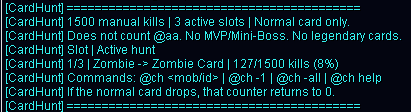
CardHunt is a special Oroza RO system designed to help players who have been unlucky while farming normal cards. It does not replace regular farming, it does not instantly give cards, and it does not apply to Legendary Cards. Its goal is to give you clear progress while hunting a specific card.
You can select up to 3 monsters to hunt their normal cards. If after 1500 manual kills of the same monster you still have not obtained its normal card, the system will automatically give you that card.
What is CardHunt?
CardHunt is a bad luck protection system. When you choose a monster with the @ch command, the server starts counting your manual kills on that monster.
If the normal card drops before reaching the limit, the counter is reset. If it does not drop after reaching the limit, the system gives you the normal card automatically.
| General behavior | |
|---|---|
| Card limit | 1500 manual kills of the same monster. |
| Active hunts | You can have up to 3 active monsters at the same time. |
| Card type | Normal cards only. |
| Auto Attack | Kills made with @aa do not count. |
| Legendary Cards | Legendary Cards are not included. |
Available commands
The recommended main command is @ch. You may also use the full command @cardhunt.
| Command | Usage |
|---|---|
| @ch | Shows your active hunts and current progress. |
| @ch <monster> | Adds a new hunt using the monster name. |
| @ch <id> | Adds a new hunt using the monster ID. |
| @ch -1 | Removes the hunt in slot 1. |
| @ch -2 | Removes the hunt in slot 2. |
| @ch -3 | Removes the hunt in slot 3. |
| @ch -all | Removes all active hunts. |
| @ch help | Shows the system help in game. |
Usage examples
You can register up to 3 different monsters. Each one has its own counter.
| Action | Example | Result |
|---|---|---|
| Add a hunt | @ch hydra | Starts counting Hydra kills. |
| Add by ID | @ch 1068 | Starts counting kills for the monster with that ID. |
| Check progress | @ch | Shows your active slots and accumulated kills. |
| Remove one slot | @ch -1 | Removes your first active hunt. |
| Clear all | @ch -all | Deletes all your active hunts. |
If you use @ch hydra and manually kill Hydras, the system will count your progress. If you reach 1500/1500 kills without receiving Hydra Card from a normal drop, you will automatically receive Hydra Card.
Important rules
- You can have up to 3 active hunts at the same time.
- Each hunt requires 1500 manual kills.
- Only kills from the selected monster count.
- Only normal cards are included.
- Legendary Cards are not included.
- MVP Cards are not included.
- Mini-Boss Cards are not included.
- Kills made with @aa / Auto Attack do not count.
- If the normal card drops before reaching 1500 kills, the counter is reset.
CardHunt does not increase card drop rates. Normal drops continue working as usual. The system only acts as a guarantee if you reach the kill limit without obtaining the card.
Normal Cards and Legendary Cards
Oroza RO has both normal cards and Legendary Cards. CardHunt only works with normal cards to protect the server economy and preserve the value of Legendary Cards.
| Type | Example | Does it count for CardHunt? |
|---|---|---|
| Normal Card | Poring Card — ID 4001 | Yes. |
| Legendary Card | Legendary Poring Card — ID 47001 | No. |
Even though CardHunt does not give Legendary Cards, normal cards remain useful because they are an important part of server progression, trading, and special systems.
Why does it not count with @aa?
CardHunt is designed to reward manual farming. For that reason, kills made with @aa or Auto Attack do not increase your progress.
If you are using @aa, monsters killed during Auto Attack will not increase your CardHunt counter.
This rule keeps the system fair for everyone and prevents normal cards from losing too much value.
When is the counter reset?
A hunt counter can reset for two main reasons:
The card drops normally
If you are hunting Hydra Card and the card drops before reaching 1500 kills, the system considers that you already received the reward and resets that counter.
You reach 1500 kills
If you reach 1500 manual kills without obtaining the card, CardHunt gives you the normal card and then resets that counter.
Frequently asked questions
| Question | Answer |
|---|---|
| Does CardHunt increase card drop rates? | No. Normal drops remain the same. CardHunt only gives the card if you reach the limit without obtaining it. |
| Can I hunt more than 3 cards? | Not at the same time. You can have up to 3 active hunts. |
| Does it count while using @aa? | No. CardHunt only counts manual kills. |
| Does it work with MVP Cards? | No. MVP Cards are excluded. |
| Does it work with Mini-Boss Cards? | No. Mini-Boss Cards are excluded. |
| Does it work with Legendary Cards? | No. Legendary Cards are excluded from this system. |
| What happens if I remove a hunt? | That slot becomes available. If you add the same hunt again, it will start over. |
To make normal card farming feel fairer for unlucky players, without breaking the economy, without affecting Legendary Cards, and without replacing manual farming effort.